
If you want to delete an FTP account, you can accomplish it by following this tutorial.
1. Log in to your cPanel account.
2. In the Files section, click on FTP Accounts.
 
3. Under the FTP Accounts list, choose Delete.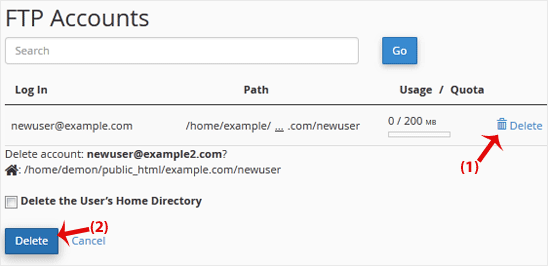
4. Click on Delete once again to confirm and remove the FTP account.
Warning: Do not use the Delete the Users Home Directory option. Otherwise, the data inside your FTP user account will also be deleted and will become unrecoverable unless you restore it with a backup.
- Home
-
Store
- Browse All
- -----
- License Reseller account
- cPanel WP Square License
- cPanel License
- Plesk Web HOST License
- Directadmin License
- Webuzo Licensing System
- AaPanel Licensing System
- CloudLinux License
- LiteSpeed License
- Virtualizor License
- KernelCare License
- Whmcs License
- DaReseller License
- WHM Reseller License
- JetBackup License
- Softaculous License
- Imunify360 License
- Sitepad License
- CPNginx Licensing System
- Lifetime Licenses
- Osm Licensing System
- CXS Licensing System
- Backuply Licensing System
- WhmXtra License
- Trial Licenses
- Register a New Domain
- Transfer Domains to Us
- Announcements
- Knowledgebase
- Network Status
- Affiliates
- Contact Us
-
More
