
Thunderbird is a friendly email client software for managing your email. You can set up a cPanel email account with Mozilla Thunderbird and receive/send the email.
1. Open Mozilla Thunderbird.

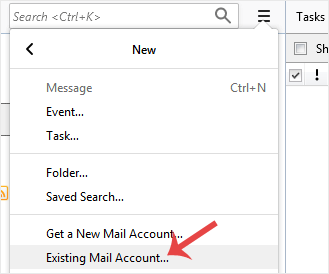
2. Click on the menu icon located on the right side of the screen and choose New. A drop box will open.

3. Click on Existing Mail Account.
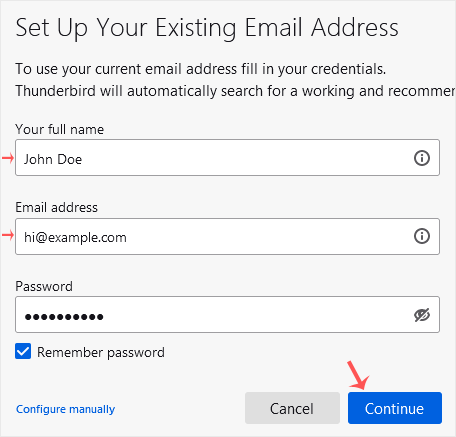
4. In the Mail Setup Account, fill out your name, full email address, and your email account password. Proceed with Continue.
5. It may take a few minutes to configure your email account. After that, click on Done.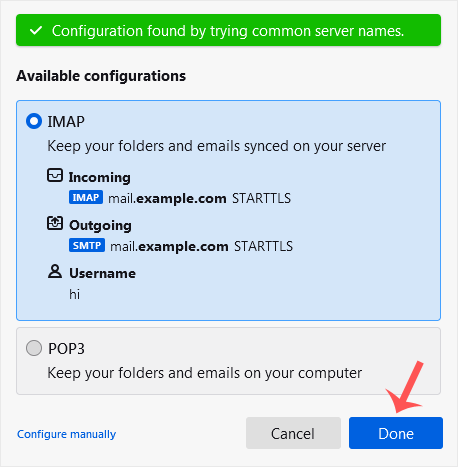
6. If it shows an SSL Security Exception, click on Confirm Security Exception and the warning will disappear.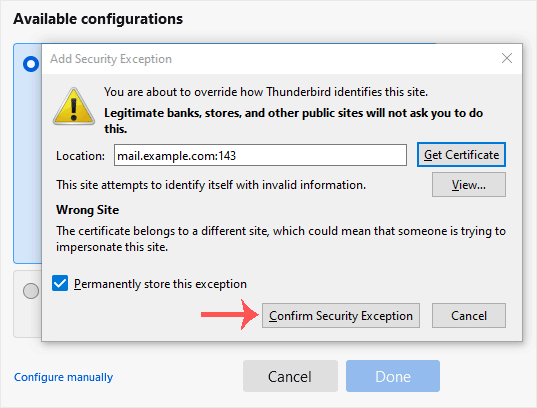
Congratulations, your email is set up successfully. You can now manage your email through Mozilla Thunderbird.
- Home
-
Store
- Browse All
- -----
- License Reseller account
- cPanel WP Square License
- cPanel License
- Plesk Web HOST License
- Directadmin License
- Webuzo Licensing System
- AaPanel Licensing System
- CloudLinux License
- LiteSpeed License
- Virtualizor License
- KernelCare License
- Whmcs License
- DaReseller License
- WHM Reseller License
- JetBackup License
- Softaculous License
- Imunify360 License
- Sitepad License
- CPNginx Licensing System
- Lifetime Licenses
- Osm Licensing System
- CXS Licensing System
- Backuply Licensing System
- WhmXtra License
- Trial Licenses
- Register a New Domain
- Transfer Domains to Us
- Announcements
- Knowledgebase
- Network Status
- Affiliates
- Contact Us
-
More
