
The automatic installation of a plugin is easy and straightforward. However, you can also install it manually. It will involve manually downloading a plugin, uploading, and activating it.
Make sure you have already downloaded a zip file of the plugin to your desktop.
1. Log in to the WordPress dashboard.
2. From the Dashboard menu, go to Plugins and click on Add New.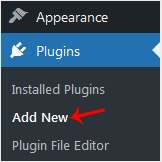
3. Click on Upload Plugin and then on Browse. Choose your plugin's zip file and click Install Now.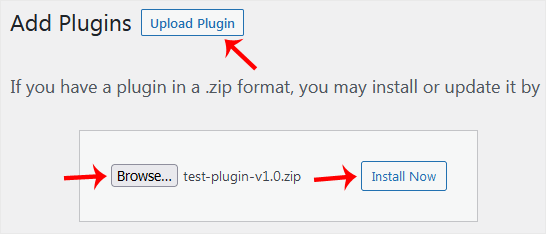
4. Click on Activate Plugin.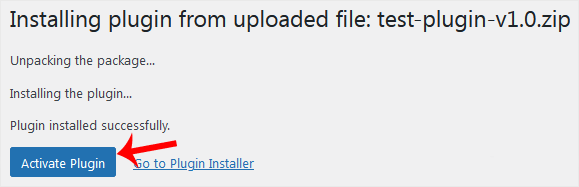
Note: After activating a plugin, a new menu of that plugin is added to the Dashboard menu.
- Home
-
Store
- Browse All
- -----
- License Reseller account
- cPanel WP Square License
- cPanel License
- Plesk Web HOST License
- Directadmin License
- Webuzo Licensing System
- AaPanel Licensing System
- CloudLinux License
- LiteSpeed License
- Virtualizor License
- KernelCare License
- Whmcs License
- DaReseller License
- WHM Reseller License
- JetBackup License
- Softaculous License
- Imunify360 License
- Sitepad License
- CPNginx Licensing System
- Lifetime Licenses
- Osm Licensing System
- CXS Licensing System
- Backuply Licensing System
- WhmXtra License
- Trial Licenses
- Register a New Domain
- Transfer Domains to Us
- Announcements
- Knowledgebase
- Network Status
- Affiliates
- Contact Us
-
More
