ÂÂÂÂ
1. Open Outlook 2019.

ÂÂÂÂ
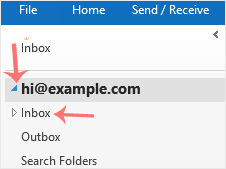
2. In the left panel. You can see a list of your email accounts, double-click on it to expand.
ÂÂÂÂ
3. Click on Inbox, and it will start syncing.
ÂÂÂÂ

ÂÂÂÂ
1. Open Outlook 2019.
ÂÂÂÂ
2. In the left panel. You can see a list of your email accounts, double-click on it to expand.
ÂÂÂÂ
3. Click on Inbox, and it will start syncing.
ÂÂÂÂ
